A while ago, I was building extensions for OpenClaw and needed to understand its source code and configuration in depth. My initial approach was fairly ordinary: clone the repository, open a Claude terminal inside it, and repeatedly ask it to skim and closely inspect the code, draw architecture and flow diagrams, and run /clear whenever the context grew too long.
It did not take long to run into three problems:
- The same questions kept coming up. Different entry points and modules overlap, making it difficult for a single conversation to cover everything.
- Conclusions were scattered across multiple contexts. When I started a new conversation, the model had not truly “remembered” what it had explored before.
- The understanding never became a project asset. Knowledge of the codebase remained trapped in chat logs and could not be reliably reused by the next task.
This is not unique to OpenClaw. The same repeated cost of rebuilding context appears whenever you take over a new project, contribute to an open-source project, or build custom functionality on top of a third-party library.
So I changed the goal from “have AI answer this question” to “have AI produce a body of codebase knowledge that can be reused later.”
The Core Method: Three Roles—A, B, and C—Cross-Validate One Another
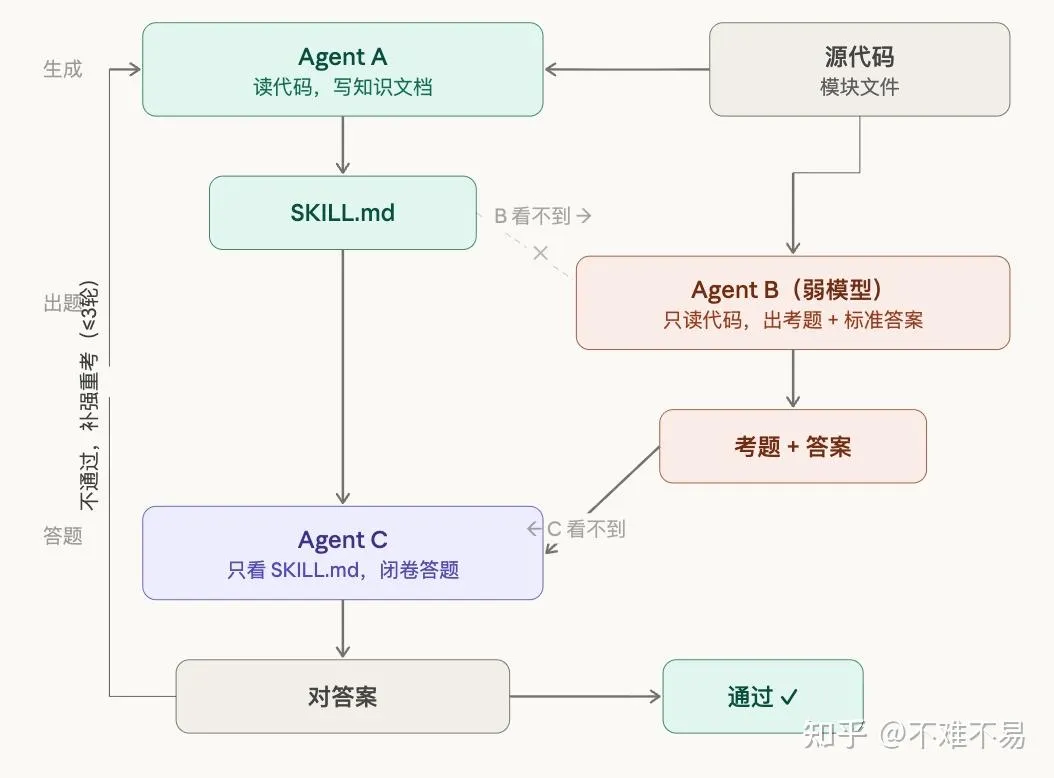
The first step is to have the model explore the codebase and divide it into functional modules. Each module then goes through up to three rounds of an ABC workflow:
| Role | What it can see | Responsibility | Output |
|---|---|---|---|
| Agent A | Source code, configuration, and existing context | Read the code deeply and organize knowledge about the module | SKILL.md |
| Agent B | Source code, but not A’s documentation | Independently create questions and write answer keys | Questions, answers, and coverage areas |
| Agent C | Only A’s SKILL.md | Answer B’s questions closed-book | Answers and missing information |
During validation, C’s answers are compared with B’s answer key. If C cannot answer using the documentation alone, A’s documentation still has gaps. The process returns to A to fill them in, B creates new questions covering areas that have not yet been tested, and C takes another round of the exam.
Source Code ──┬──> Agent A ──> SKILL.md ──> Agent C ──> Compare Answers ──> Pass
              │                                  │                    │
              └──> Agent B ──> Questions + Answer Key ───┘            └──> Add Missing Details and Start Next Round
There is an important separation of information here: B does not see the documentation written by A, and C does not see the source code. This means the validation target is no longer “whether the model can find the answer again,” but “whether the knowledge document itself is sufficiently self-contained.”
Why B Uses a Weaker Model
B’s job is to find a sufficiently broad set of questions in the source code, not to produce the deepest possible source-code analysis. In practice, I use a cheaper, faster model for this role, such as Haiku.
A weaker model reads the code less deeply, but that can actually make it more likely to ask the kinds of questions that help someone get started with an unfamiliar codebase: What is the module responsible for? Where are its key entry points? How does state flow through it? Which files need to change when modifying a feature? This preserves the more expensive model’s context for work that genuinely requires deep reasoning.
Why Every Round Needs New Questions
B can see the questions asked in previous rounds, but each new round must cover areas that have not yet been tested. This forces A to complete the broader body of knowledge instead of editing the documentation only around known questions.
It is a simple defense against teaching to the test: as the questions continuously expand their coverage, the documentation has a chance to evolve from a partial summary into a module-level knowledge base.
What Should SKILL.md Contain?
Each module’s knowledge file should cover at least five dimensions:
- Responsibilities and capabilities: What the module does, along with its public APIs and key function signatures.
- Core design logic: Why it is designed this way, including important architectural decisions and trade-offs.
- Data structures: Core types, interfaces, and the relationships between them.
- State transitions: Where data enters, which steps it passes through, and how errors are handled.
- Modification guide: Which files, entry points, and tests need to change when adding a new capability.
The fifth item is the most useful in day-to-day development. The purpose of reading code is usually to continue modifying it. Being told exactly which files to touch reduces the startup time for the next task far more than a generic walkthrough of the architecture.
The tool also generates a global index containing:
- a one-sentence description of each module’s responsibility;
- dependencies between modules;
- entry points and operational paths for cross-module features;
- sets of files involved in common modification tasks.
Ideally, a new conversation only needs to read the global index first, then load the relevant modules’ SKILL.md files for the task at hand. The knowledge files are partitioned by module, while the index provides navigation. Together, they keep the context size under control.
Installation and Usage
Install the skill:
git clone https://github.com/CiferaTeam/deep-code-reader.git
cp -r deep-code-reader/deep-code-read ~/.claude/skills/
You can then start reading either a remote repository or a local path:
/deep-code-read https://github.com/example/project ~/.claude/skills/
# Or use a local path
/deep-code-read ./path/to/project ~/.claude/skills/
This uses superpowers as a formatting dependency. The point of the overall process is to turn exploration, deep reading, question generation, validation, and organization into a repeatable workflow instead of improvising a new set of prompts every time.
A Real-World OpenClaw Run
The screenshots below come from a run in which I examined OpenClaw v2026.3.12 (commit 70d7a085). They reflect the code and runtime results for that specific version. As the project evolves, module names, constants, and function locations will change.
I started the task before going to bed and let it read the modules deeply in parallel. When I returned the next day, the first screen already showed 10 Agent A instances running in the background:

The tool then displayed progress module by module:
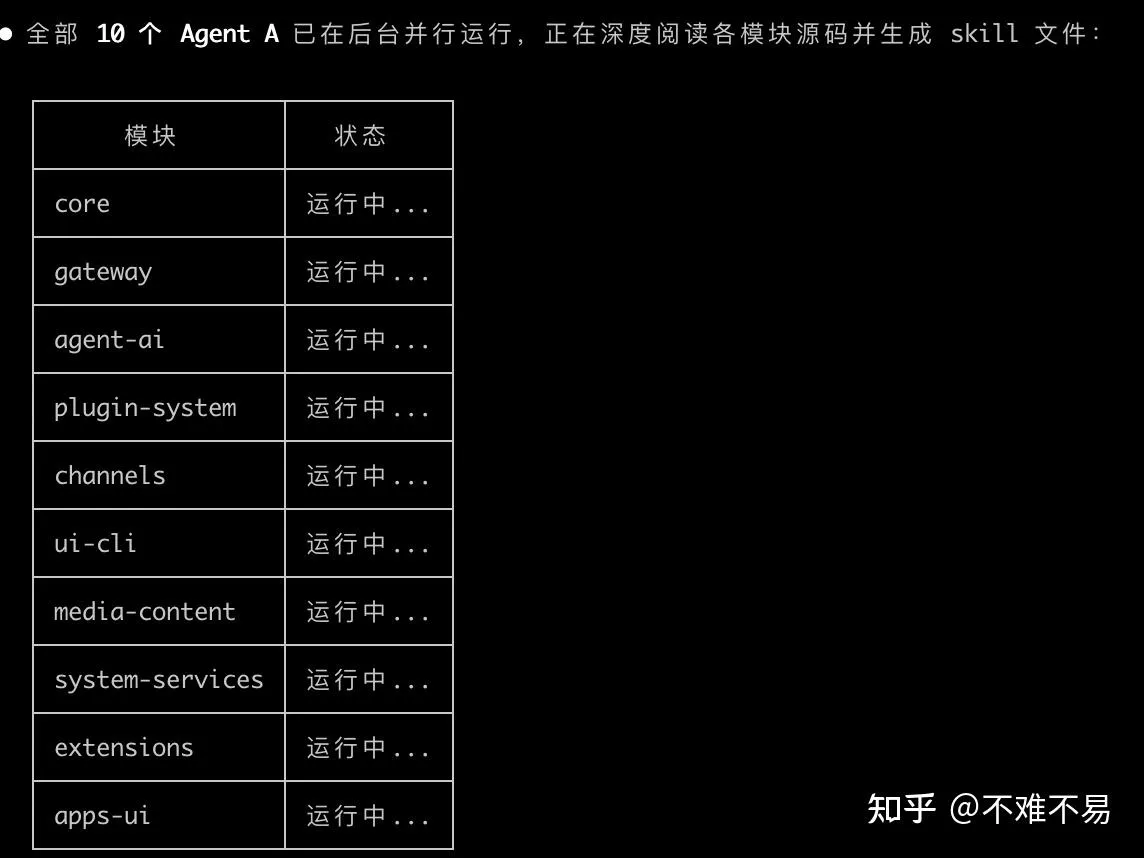
The approximate statistics from one complete run were:
- 10 modules in total;
- 82 questions generated in the first round;
- 38/82 passed in the first round, or about 46%;
- 40 gaps were identified and sent back to Agent A;
- all 45/45 follow-up questions passed after the documentation was improved;
- 21 skill files were generated: 10 module documents, 10 reference documents, and 1 global index;
- around 50 agent invocations in total.
These numbers do not mean the tool will achieve the same results on every repository, but they demonstrate one thing clearly: the first result that “looks finished” may still be far from reusable.
Failing the First Round Does Not Mean the Process Failed
During the first validation round, the core module failed all eight questions. The gaps included details such as log rotation, sensitive-information redaction, Secrets error handling, Schema prototype-pollution protection, Home directory precedence, IPv4/IPv6 utilities, and Secret reference constraints.
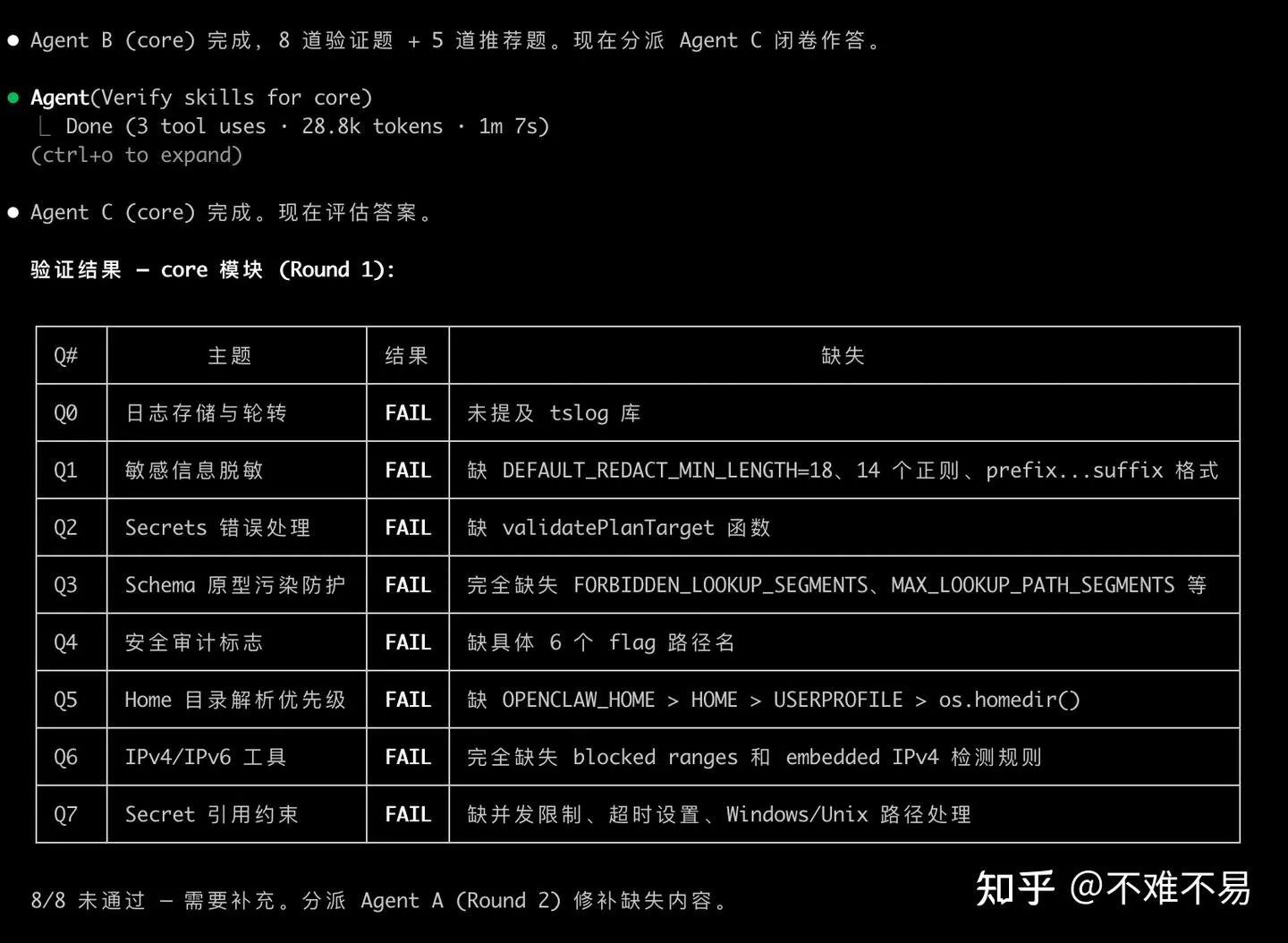
If I had looked only at Agent A’s first summary, it would have been easy to assume these topics were “already covered.” Closed-book validation turned them into an actionable checklist of missing information.
In the second round, Agent A only needed to continue filling those specific gaps:
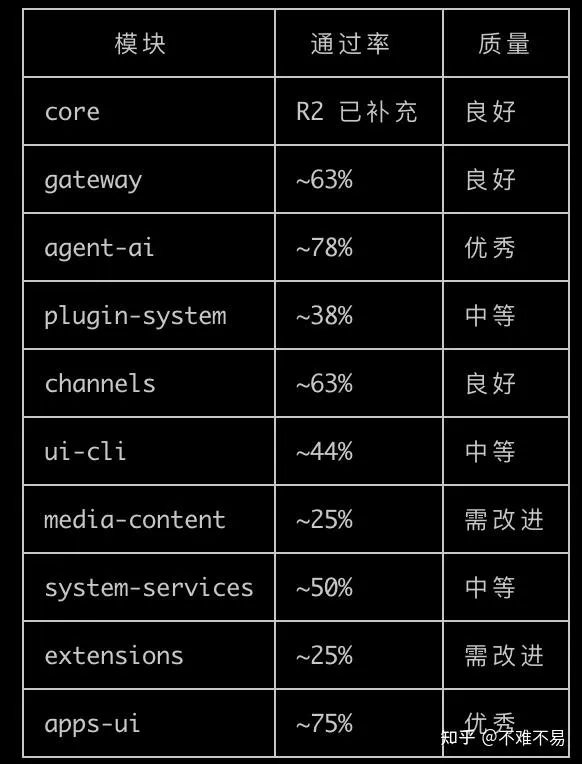
After subsequent validation, module-level quality and coverage gradually stabilized:
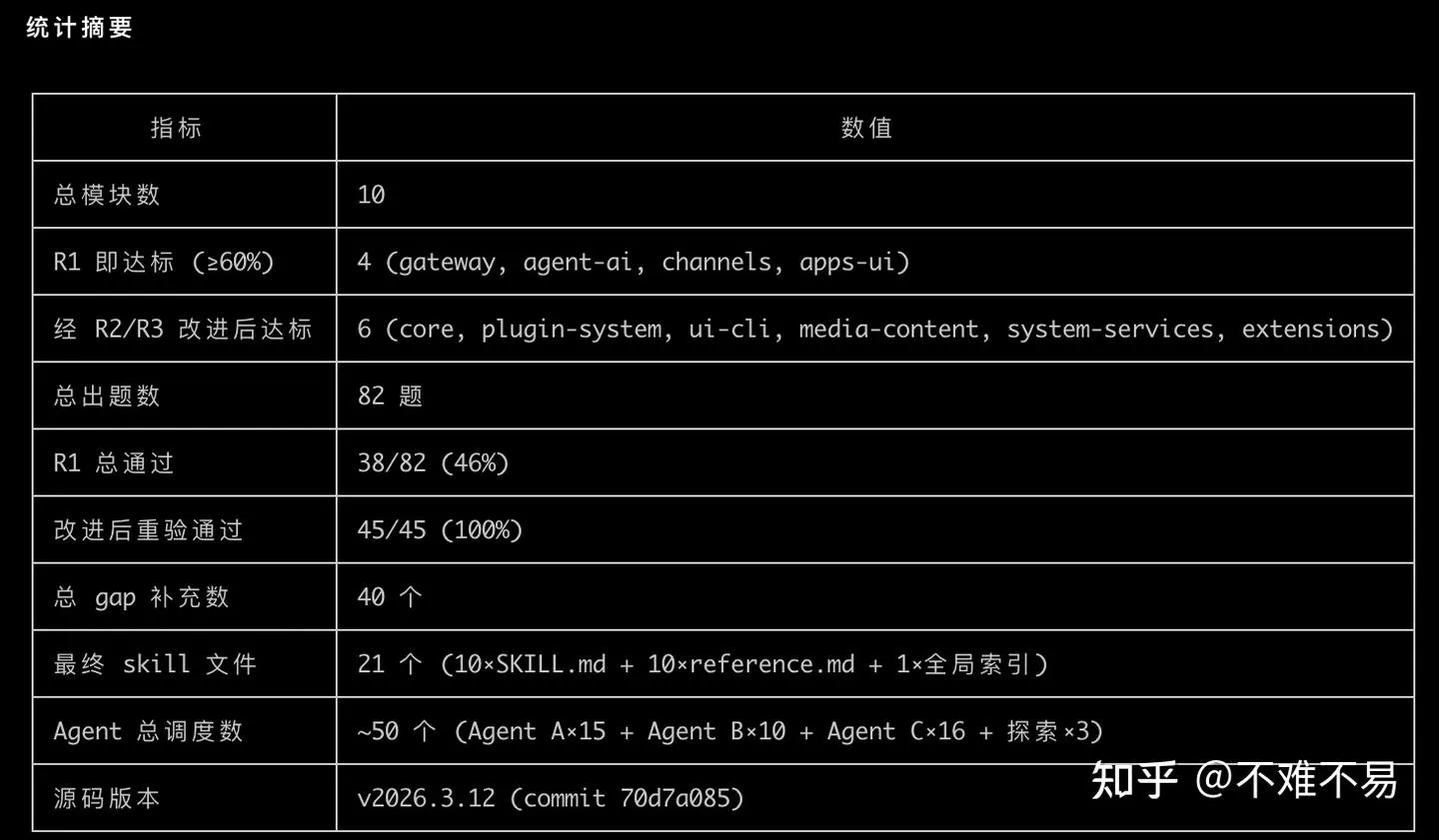
The final statistics show that only 38/82 questions passed in the first round, with 40 gaps filled along the way. After the additions, all 45/45 follow-up questions passed:
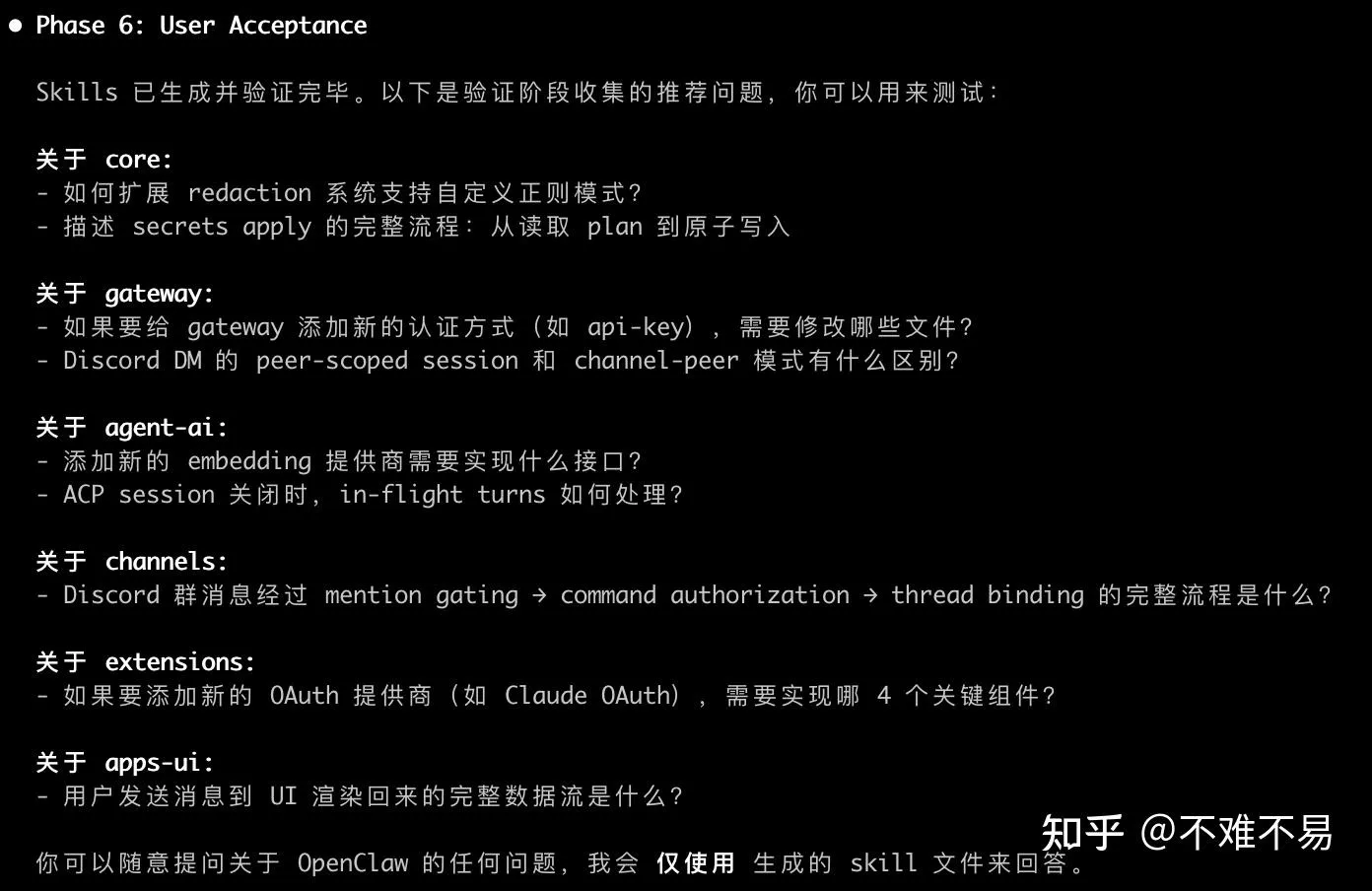
Using the Generated Knowledge to Answer Real Questions
After completing the codebase review, I did not immediately return to the source code. Instead, I asked questions directly using the generated skills. The following are abbreviated versions of several of them.
Conversation Turns, UI Pruning, and Compaction Are Three Different Things
The question was: OpenClaw’s channel displays a maximum number of conversation turns. Does that mean older history is continuously evicted once the limit is exceeded, causing a large number of LLM cache misses?
The analysis at the time separated this into two layers:
- UI presentation layer: The
ChatLogcomponent has amaxComponentslimit. Once the threshold is exceeded,pruneOverflow()removes earlier UI components. This affects rendering performance and what appears on screen. - LLM context layer: At the end of each turn,
afterTurn()checks the token budget. If the budget is exceeded, it triggers staged summarization and then prunes history according to its share of the context.
The main flow in the version I examined could be simplified as:
afterTurn()
  -> Check Token Budget
  -> summarizeInStages()
       -> chunkMessagesByMaxTokens()
       -> summarizeWithFallback()
       -> Merge Stage Summaries
  -> pruneHistoryForContextShare()
Key parameters in that version included BASE_CHUNK_RATIO=0.4, MIN_CHUNK_RATIO=0.15, SAFETY_MARGIN=1.2, and SUMMARIZATION_OVERHEAD_TOKENS=4096. These values belong only to the code snapshot examined during that run and cannot substitute for checking the source code of the current version.
The conclusion was that compaction changes the prompt prefix from raw messages to a summary, which may invalidate caches that rely on prefix matching. However, this is usually a discrete change that occurs when the context approaches its budget. Cache misses are therefore more likely to appear as periodic spikes than to occur on every turn.
How Slack Threads and Feishu’s Single-Window Model Enter the Context
The second question was: Slack has nested threads, while Feishu behaves more like a single window. Do they use the same format when assembling chat content?
From the perspective of the LLM, each channel first normalizes its messages into an object resembling MsgContext:
MsgContext {
  Channel: "slack" | "feishu" | ...
  ChatType: "direct" | "group" | "channel"
  Body: string
  ReplyToId: string
  MessageThreadId: string
  ThreadLabel: string
}
What actually determines the context boundary is the session key and thread binding:
| Dimension | Slack thread | Feishu single window |
|---|---|---|
| Message structure seen by the LLM | Unified message context | Unified message context |
| Session granularity | A thread can form an independent session | Multiple messages share a window-level session |
| History scope | Messages in the current thread | Messages accumulated in the current window |
| Compaction pressure | Usually lower | More likely to increase as the window grows |
So “whether the message formats are consistent” and “whether the context boundaries are consistent” are two separate questions. The former can be unified, while the latter is determined by the channel’s threading semantics and session strategy.
Where Logic Can Be Inserted Before Tool Calls on Each Turn
The third question was more architectural: which plugins and hooks can be replaced within the context-assembly flow before a tool is called on each turn?
The main chain I mapped at the time was:
Receive Message
  -> Build MsgContext
  -> before_model_resolve
  -> Load Workspace Files
  -> before_prompt_build
  -> Context Engine assemble
  -> Memory Search
  -> LLM API Call
  -> before_tool_call
  -> Execute Tool
  -> tool_result_persist / before_message_write
  -> afterTurn / compaction
The key insertion points serve different purposes:
| Hook | Suitable uses |
|---|---|
before_model_resolve | Select a provider or model based on the task |
before_prompt_build | Inject authorized content before or after the system context |
before_tool_call | Modify, block, or cancel tool calls |
tool_result_persist | Redact and filter results before they are written to the transcript |
before_message_write | Modify or prevent messages from being persisted |
message_sending | Modify or cancel a message before it is sent |
In addition to hooks, three module-level slots can be replaced wholesale:
- Context Engine: Replace the implementations of
assemble(),compact(),ingest(), andafterTurn(); - Memory Engine: Replace the memory-retrieval backend and change the source of retrieved results;
- ACP Runtime: Register different session execution backends through the plugin API.
Prompt injection requires separate permission handling. before_prompt_build and before_agent_start can alter the model context, so the system at the time required plugins to explicitly enable allowPromptInjection before they could inject system context.
The value of these conclusions is not in memorizing every hook name, but in building a navigation map for modifications: when you want to change model routing, prompt assembly, tool invocation, transcript persistence, or the context engine, start by looking for the implementation at the corresponding boundary.
Practical Recommendations
Treat Deep Reading as a Background Task
A medium-sized project with 5–10 modules may take an hour or two. Start it when you do not need to interact with it, then inspect the generated index, failed questions, and supplementation rounds the next day.
Read Only the Modules You Actually Need to Modify
You do not need to cover the entire repository every time. If the current task involves only gateway, agent-ai, and channels, start with those modules and read the others when a cross-module change requires them.
Put the Generated Skills in the Workspace
Place the module documents and global index somewhere the coding agent can load reliably. In a new conversation, read the index first and then load the relevant modules. This keeps the context smaller and turns “I already read this project last time” into a reusable fact.
Judge Quality with Test Questions, Not Word Count
A long document does not necessarily cover the code well. More reliable checks include:
- Can C answer questions about module entry points and key state transitions using only the documentation?
- Can C identify which files should change when adding a feature?
- Can the functions, constants, and paths mentioned in the documentation be located in the source code of the corresponding version?
- Can the global index route a cross-module question to the correct local documents?
Boundaries to Keep in Mind
This method is highly useful, but the knowledge it produces still has clear version boundaries.
- Large refactors require relearning: Small changes can be incorporated incrementally, but broad refactors may make old documentation misleading;
- Sensitive code requires controlled input: Private repositories, credentials, customer data, and internal configuration should not be sent to external models without authorization;
- Knowledge documents cannot replace source-code validation: For security, data migrations, and runtime behavior, you still need to test against the current commit;
- Time and tokens have a cost: Using a weaker model for B can control costs, but multiple rounds of validation by A and C still require a budget.
These boundaries also clarify the role this system is suited to play: it is a cognitive index and modification guide for a codebase, not a permanent truth detached from version control.
Who Is It For?
The most immediate beneficiaries are hands-on developers who frequently need to read unfamiliar code:
- writing plugins for a framework;
- extending a third-party library after understanding its internals;
- taking over a project without complete documentation;
- reusing the same body of codebase knowledge across multiple coding-agent conversations.
More broadly, the idea of “having AI systematically learn a domain, validating that knowledge through exams, and finally preserving it as loadable knowledge” is not limited to code. It can also be used to organize protocols, runbooks, and long-lived domain expertise.
Conclusion: Build a Pluggable Knowledge Base
What I most want to preserve is not any particular SKILL.md file, but a way of working:
- Divide the exploration scope into manageable modules;
- Assign separate roles to understanding, question generation, and validation;
- Turn failed answers into a checklist of missing information;
- Save validated content as knowledge that can be loaded directly next time.
What matters is not the number of skills, but starting today to build your own “pluggable knowledge base.” When the next task arrives, the AI no longer has to relearn the entire project from an empty context, and people can spend their time on the design and modifications that actually matter.
The tool is now open source:
- deep-code-reader, licensed under MIT;
- openclaw-skills, the OpenClaw skills generated during this code-reading run.
It has currently been tested successfully with Claude Code. Its design remains platform-independent, so in principle it should also work with programming tools capable of loading skill files and orchestrating sub-agents. Questions and suggestions are welcome through GitHub issues.